
React JSX – JSX in React
Dev Samay
Senior ReactJS Developer

React JSX is the React JavaScript extension, or you can say react JavaScript XML, both are same. So the question is what is React JSX? And why need to...
React JSX is the React JavaScript extension, or you can say react JavaScript XML, both are same. So the question is what is React JSX? And why need to know about it?
React’s JavaScript Extension JSX (JavaScript Extension) allows you to write JavaScript code that looks similar to HTML. JSX, an HTML-like syntax that React uses to extend ECMAScript, allows the syntax to co-exist with JavaScript/React. The syntax is preprocessors, i.e., source to source compiler such as babel, to convert HTML-like syntax into a standard JavaScript object that a JavaScript engine can parse.
JSX allows you to create HTML/XML-like structures, such as DOM-like tree structures, in the same file you write JavaScript codes. The preprocessor will then transform these expressions into actual JavaScript Code. JSX tags are similar to XML/HTML in that they have a tag name and attributes.
I know it just looking somewhat confusing, So let’s take an example to understand about it:
App.js
1import React, { Component } from 'react';
2class App extends Component{
3 render(){
4 return(
5 <div>
6 <h1>Hello World!!!!</h1>
7 </div>
8 );
9 }
10}
11export default App;
12
So we have here imported react and component, we need to import these packages to work in react, and we have to extend app class with component, so whatever we write here add to class file as we talk in previous tutorial. Now for render function, this will be used to show the data or whatever you write in this will be show on in the browser. In render function we used div, in this div we added a h1 tag similar to the HTML, so the output we get is:

Looks similar to HTML, right? So we have used 2 HTML tags, these tags are the React JSX. To check it you just need to comment the line in which we have imported the React in index.js file to remember that, then the output will be:
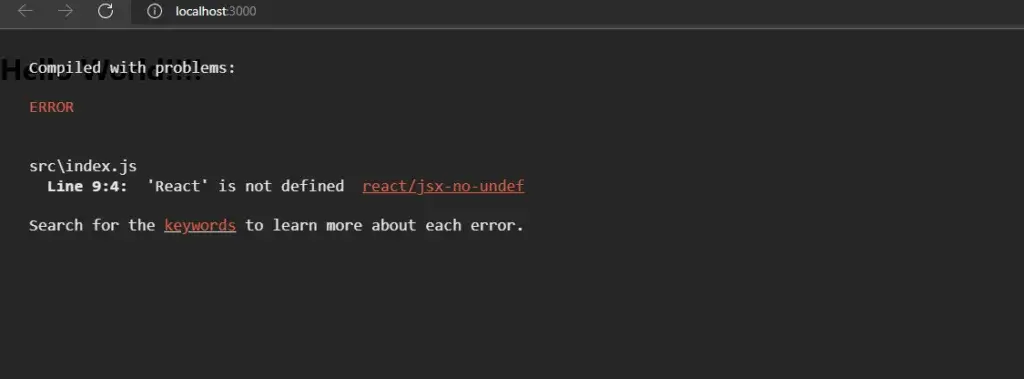
In this, you can see the error react is not defined, hence you can’t use JSX.
Why use React JSX?
- Because it optimizes the code while translating it to JavaScript, it is much faster than regular JavaScript.
- React uses logic and markup in one file instead of separating technologies. In a subsequent section, we will cover components.
- It is type-safe, and most errors can be detected at compilation time.
- It is easier to create templates.
Nested Elements in JSX
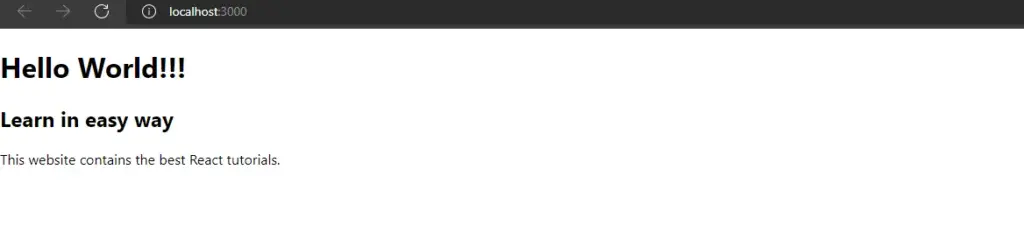
You need to wrap more than one element with one container element. This div container element has three nested elements.
App.js
1import React, { Component } from 'react';
2class App extends Component{
3 render(){
4 return(
5 <div>
6 <h1>Hello World!!!</h1>
7 <h2>Learn in easy way</h2>
8 <p>This website contains the best React tutorials.</p>
9 </div>
10 );
11 }
12}
13export default App;
14
Output
Attributes in JSX
We can also use custom HTML attributes and properties and standard HTML properties. Data prefix is required when adding custom attributes. We have added data-attribute, As an attribute of the p element in this example:
App.js
1import React from 'react';
2class App extends React.Component
3{
4 render() {
5 return (
6 <div>
7 <h2>This is heading 1</h2>
8 <h3>This is heading 2</h3>
9 <p data-attribute = "firstattr">This is a Paragraph!!!</p>
10 </div>
11 );
12 }
13}
14export default App;
15
Styling in JSX
App.js
1import React from 'react';
2class App extends React.Component {
3 render() {
4 var heading = {
5 fontSize: 130,
6 color: 'blue'
7 }
8 return (
9 <div>
10 <h2 style = {heading}>React Guru</h2>
11 </div>
12 );
13 }
14}
15export default App;
16
React recommends using inline styles. We must use the camelCase syntax whenever we need to set up inline types. The above example illustrates how to add heading to element the h1.
Output

JSX Comments
App.js
1import React, { Component } from 'react';
2class App extends Component{
3 render(){
4 return(
5 <div>
6 <h1 className = "hello" >Hello World!!!</h1>
7 {/* This is a comment in JSX */}
8 </div>
9 );
10 }
11}
12export default App;
13
React JSX allows users to use remarks that start with /* and end with or */ and wrap them {in curly braces with curly braces, similar to the example for JSX expressions. This example illustrates how to make use of comments within JSX.
JSX Expressions
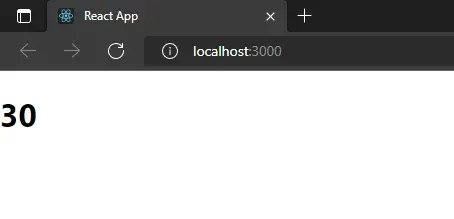
Inside JSX, JavaScript expressions can be utilized. You just wrap it up {in curly brackets}. This example illustrates rendering 2.
1import React from 'react';
2class App extends React.Component
3{
4 render() {
5 return (
6 <div>
7 <h1>{ 10 + 20 }</h1>
8 </div>
9 );
10 }
11}
12export default App;
13
Output
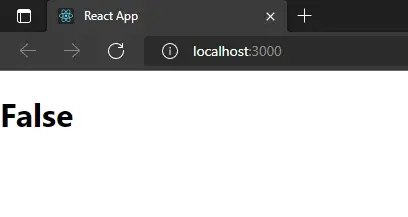
We aren’t able to utilize the conditional (ternary) expressions when other statements are in JSX instead. In the following example variable I is 1 thus the browser renders true. However, it’ll be false if we alter the value to another one.
1import React from 'react';
2class App extends React.Component
3{
4 render() {
5 var i = 4;
6 return (
7 <div>
8 <h1>{i == 7 ? 'True!' : 'False'}</h1>
9 </div>
10 );
11 }
12}
13export default App;
14
Output
About Dev Samay
Senior ReactJS Developer with extensive experience in building scalable web applications. Passionate about modern JavaScript frameworks, best practices, and creating exceptional user experiences.